-

- Tech deals Apps
- Where Winds Meet
- PUBG MOBILE
- Home & Furniture Shopping Apps
- Football Manager 27 Mobile
- Price Tracker Apps
- Drag Bike 201m Sunmori
- PUBG MOBILE FLASH
- AI Learning Apps
- UnGodly
- Taobao
- Best Games like Grand Theft Auto VI
- NTE: Neverness to Everness
- One State RP





Information about OGInsta+ 10.14.0
Basic information
 |
Developer | OGmods |
|---|---|---|
 |
Category | Multimedia Tools |
 |
Rating | Not specified |
 |
Languages |
English 34 more
|
Distribution model
 |
Pricing | Free |
|---|---|---|
 |
License | Proprietary |
 |
Copyright © 2026 OGmods | |
 |
Why is this app published on Uptodown? | (More information) |
System requirements
 |
Operating System | Android |
|---|---|---|
 |
Architecture | armeabi-v7a |
|
See more variants |
Security and privacy
 |
Required permissions |
See 26 permissions |
|---|---|---|
 |
Certificate signature | cd91a5a79be6e342f777e443310879cb |
 |
See security and antivirus report |
Download info
 |
Downloads | 9,397,703 |
|---|---|---|
 |
Date | Jul 18, 2025 |
 |
File type | APK |
 |
Size | 25.38 MB |
|
SHA256 |
84257e7e4f3095fc041ef281e0f92010f4776c8fb032ce896574d1528f5dc402 |
Technical details

|
Package Name | com.oginstagm.android |
|---|
What's next?
Tap "Download" to get the file and open it. If prompted, allow the installation and then tap "Install" to start using the app.
How to install this app on your Android device
APK
APK - Manual installation
1- Tap Download to get the APK file.
2- Locate it in your notification bar or in the Downloads folder, then tap to begin installation.
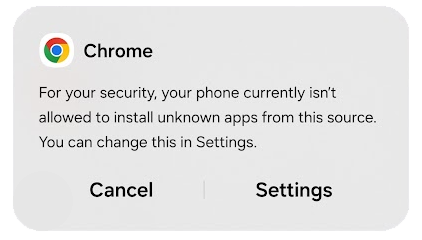
3- If this is your first time using Uptodown, you may see a message asking you to enable app installs from unknown sources in your browser. To do this, tap Settings in the pop-up and turn on Grant permission.
4- Follow the on-screen instructions to complete the installation.
APK
APK - Installation using the Uptodown app
1- Tap Download to get the APK file.
2- If Uptodown App Store is installed, you can select it as an alternative to Android's default package installer.
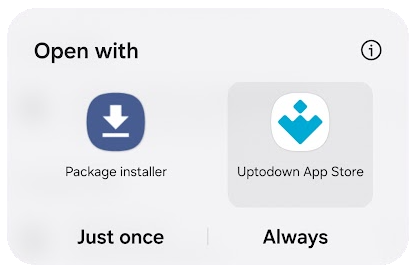
3- The app will guide you through the installation process.
4- If this is your first time installing from Uptodown, you may need to grant installation permissions in your device settings.
Frequently asked questions
I can't install the app.
- Unknown sources not enabled: Allow installation from unknown sources for your browser or the official Uptodown app (depending on where you're downloading) in Settings > Apps. For more details, visit our Help Center.
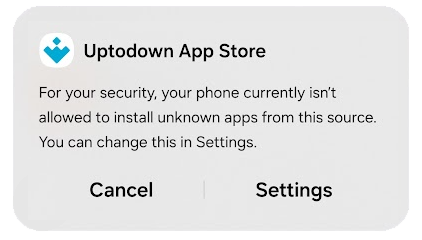
- Minimum Android version not supported: Make sure your device meets the minimum Android version listed under Requirements on the download page. Also, check compatibility with the file's architecture under Architecture in the app info.
- Not enough storage space: Free up space by removing apps or files you don't need. If downloaded via a browser, the APK/XAPK file remains on your device, so you'll need at least twice the installer's file size in free space.
- Corrupt or incomplete file: If your connection is unstable or slow, the file may not download completely. If the installation fails, try downloading it again.
- Version conflict: If you already have the app installed from another source with a different signature, uninstall it before installing from Uptodown.
- Installer permissions: Ensure the app you're using to install (browser, file manager, or Uptodown App Store) has permission to install apps.
The app installs but doesn't work.
- Minimum requirements not met: Sometimes apps install even if requirements aren't met, but they may not function properly. Verify that your device meets the RAM, processor, and Android version requirements listed in the technical sheet on Uptodown.
- Discontinued app: Some apps remain available on Uptodown even if their developers no longer maintain them. Apps with online features may not work. Check the publish date of the latest file or visit the developer's official page.
- Architecture incompatibility: Some apps require specific architectures (e.g., ARM, ARM64, x86). Check under Older versions to see if one is compatible with your device.
- Corrupt data or cache: If locally saved app data causes issues, go to Settings > Apps, select the app, and clear cache and data. Back up any important information first.
- Outdated version: If you installed an older version, the app may require an update. Check Uptodown to confirm you have the latest release.

Apps recommended for you







Older versions